Goal is to create a robust and easily extendable interaction system that allows for the use of both environmental interactions, and among us style mini-games.
Learn software development for career and honors research
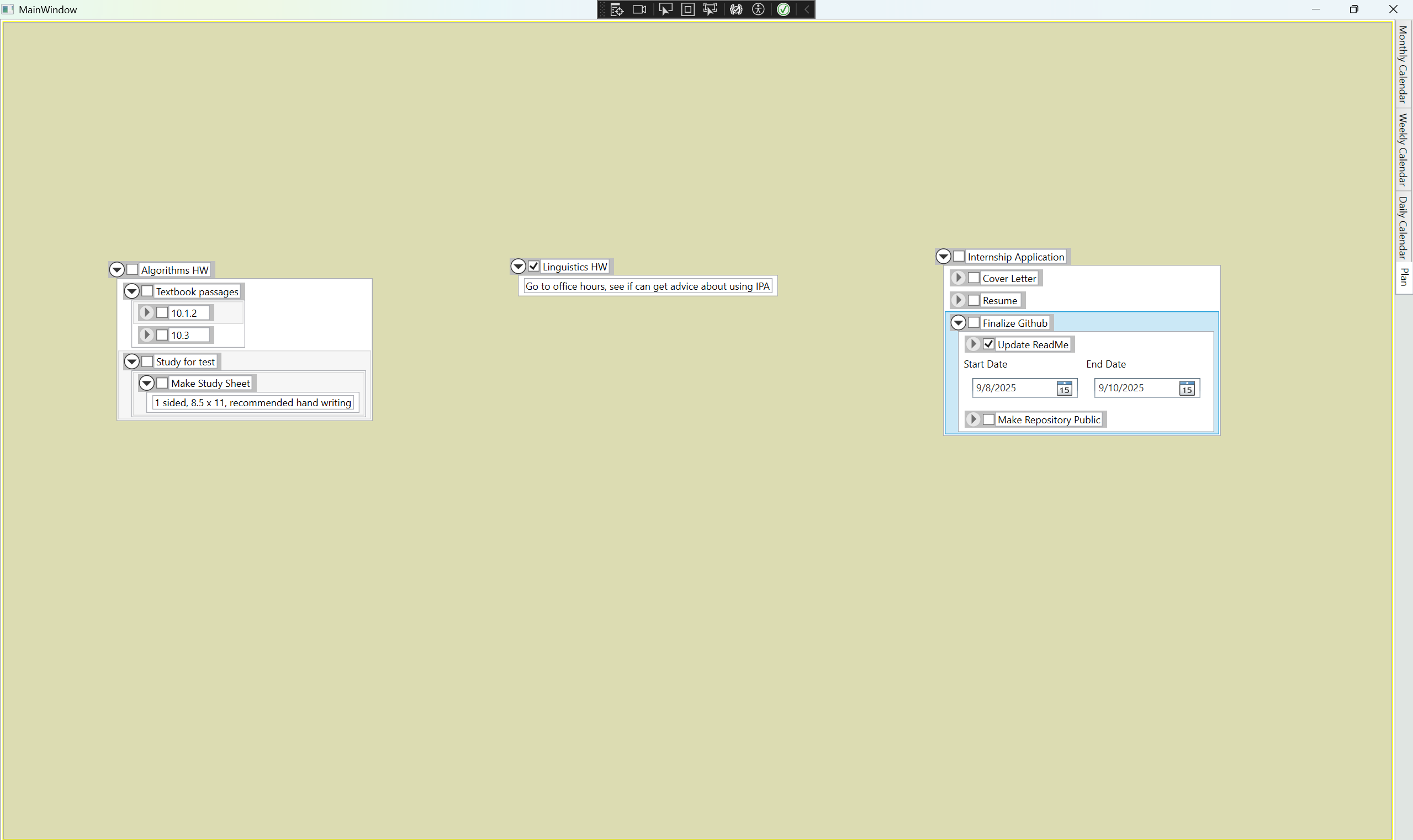
Create a program able to replace my planner which I use for writing down tasks I need to do and when to do them
I want to have a plan, that can have individual tasks (that can be marked as complete), which can be broken down into smaller sub-tasks, expanded on in larger text blocks, and marked as needing to be completed in certain time-frames.
How am I doing this
Software made using WPF and C#
Storing data for individual plans using XML
Storing dates in SQLite database
What am I learning
Software development principles
How to work in larger code-bases than I've previously worked in without getting overwhelmed
How to pinpoint, breakdown, and analyze my problems in a program, and working to find a solution
Tie work done by others - art, animation, etc - into game in a functional state
What I made/worked on
Tutorial System
Enemy Attack System
Boss Fight System
Enemies
What I Learned
Data Flow Diagrams
Importance of planning; I've begun every project since with at least a (digital) sticky note that notes what classes I'll need and how they'll connect together.
Cigarmonica - Game Design Club Group Project (Link)- 6 downloads
This was a group effort by my college's Game Design Club
Our goal was to make a simple game over the course of a few weeks
I was one of the main programmers: I programmed the dialogue, movement, and camera systems
Dialogue System
The dialogue system was designed to facilitate interactions between players and NPCs, but I wound up needing to add more functionality to facilitate some cutscene-like behaviors
Some of these behaviors included playing sounds, objects being made visible or invisible, and enabling the trading of items to NPCs
This functionality was difficult to implement at first, but I realized I could implement a system to check the array of strings in the dialogue for the word "Commands", and then carry out those commands (ex: activate/deactive objects, play sounds, end dialogue instead of continuing on to the next string, trade items, etc...)
Although this system wasn't the most robust, and would have sorely benefited from my learning of the Observer programming pattern sooner, I am still proud of what I was able to accomplish with the knowledge I had at the time
Other Things I worked on
The movement system is a simple point and click system; the player clicks, and the character moves (sometimes moon walks due to the camera angles) to that location
The camera system changes the player's camera angle and camera they see through when the player enters a trigger collider
While the player is moving, the camera turns towards the player, so players don't have a ton of dead spots in their vision, without needing control over the camera
I also worked on the timer system, though that was a joint effort between one other person and I; the biggest issue was figuring out how to make the timer pause when the player interacts with NPCs
What I learned
I gained a vastly improved understanding of Unity and even learned some programming concepts through my work on each of these systems
For example, I learned about Scriptable Objects, Coroutines, and the Singleton programming pattern
How to set realistic expectations for what I could program when working with other sub-teams
What I could promise and deliver upon in a quick time frame
How to reuse code to meet the needs of other sub-teams, rather than making everything from scratch
Games I made during Game Jams - MicroJam Game Submissions (Link)
Purpose
I competed by myself in multiple 48 hour game jams
Each game jam had a theme that I needed to incorporate into my game, and I would know of before the jam began
Each game jam had a prerequisite mechanic or concept I had to incorporate into my game, that was voted upon, and I would find out once the Jam began
I used these game jams as opportunities to improve my programming skills and gain practice using various programming patterns I had just recently learned of including Singletons, Observers, and Composition
I also challenged myself for two of the game jams to make some mechanics or concepts I had seen in others games and desired to figure out, such as a rudimentary enemy AI, and a rudimentary "note" or "lore document"
What I learned
I became much more proficient at using the Observer programming pattern
I also found out when to use the Singleton programming pattern (spoiler: way less often than I had been using it)
Between the second and third, I found out about the Composition programming pattern, completely changing how I did my work for the better
I also gained a better understanding of the amount of time I need to make things (specifically when I have external pressure being applied), and as a result, my games in subsequent jams became more polished within largely the same amounts of time
How I changed
During the first game jam I did, I made a game called “Precipitation on Planet P9” (link), I hadn’t yet learned of the Composition programming pattern, and as a result, much of my code was needlessly rewritten in other files
I found going back and adding to this game frustrating and time intensive, because most code required me to do things twice, once for instances of the PlayerRaindrop class, and once for instances of the EnemyRaindrop class
In the last game jam game I competed in, I made “Future Historian,” (link), and I made it a personal goal to use the Composition programming pattern as effectively as possible
Every behavior was seperated into its own component, and I was even able to reuse behaviors like shooting projectiles to apply to both players and enemies, with minimal effort required to make these usages possible in the code for these components
Web Development
Reading Ruler Firefox Plugin - Personal Project (Link)
Purpose
I decided to learn how to make web-plug ins/Add-ons (they're refered to as add-ons in firefox, but on chrome, they're plug-ins)
In order to make myself a digital reading ruler that could obscure all text outside an adjustable area
This happened because I struggled to read a particularly poorly formatted article for a class
What I made
In addition to making the reading ruler, I made it resizable directly from the Add-on's pop-up
How I did it
I followed some of the Mozilla guides for making a plug-in in order to learn to make the pop-up and inject the content script
I searched up various versions of my goal to figure out how to darken the area outside of the reading ruler, eventually learning I could use the Box-Shadow CSS feature
I combined these concepts together, in addition to learning how to send a message from my pop-up to the content script to send the size of the ruler to the pop-up if the ruler exists, to ensure that people wouldn't be constantly re-adjusting the ruler whenever they opened the pop-up
What I learned
I learned how to make a plug-in/add-on for Firefox (with minimal changes required to port it to google)
I was introduced to using JSON to store data or to store filepaths to data for plugins or other programs
I learned how to communicate between tabs or between a pop-up and a content script
My Portfolio Website
I designed and made this website from scratch. It’s been good to refresh my knowledge of HTML, CSS, and JavaScript and to have an opportunity to use it again.
Purpose
I made this website so that I would have a portfolio in which to display all of the things I've made in relation to each interest they fall under
I specifically made this website from scratch so I could refresh and deepen my knowledge of HTML and CSS
I had originally intended to use a pre-existing template to do this, which I know would look more impressive, but I had secondary intention of using this as a learning opportunity, and many of the templates I could find had incredibly complicated HTML and CSS in addition to Jquery elements which I didn't feel necessary but couldn't figure out how to remove [I have a feeling I should remove this]